Daniel's Year 5 Class
The 5A teacher at Bellbird Rise joins with an invite code, fills the school library with Year 5 resources, builds the class's paths and quizzes from them, then grades and runs a live quiz.
Start Using Qwizflow — FreeThe Journey
Joining Bellbird Rise
Daniel Costa teaches Year 5 at Bellbird Rise Primary School. Bellbird Rise is a fictional Melbourne primary school set up on Qwizflow as a demo, and Daniel and everyone else there are demo accounts. Daniel already has a Qwizflow account. The principal, Jo Whitfield, invites Daniel by email address; the invite makes a code, and because Qwizflow does not email it, Jo passes it on.
In Settings, under Have an invite code, Daniel types the code, and the request waits on Jo's overview until Jo approves it. Jo then creates the Year 5 classes. 5A is Daniel's, and its join code is how students get in.
“The code is accepted, and the school still has to approve Daniel.”
Key benefits
Teachers join a school with an invite code (TCH-XXXX)
The school approves every teacher before they reach a class
Invite codes last seven days
Each class gets a teacher, a year level and its own join code

Bellbird Rise (demo) · Part 1 · 3:45
Setting up a new school: principal and staff
Filling the School Library
Under the school's rule, AI content can only come from the school's own materials, so nothing can be built until the library holds some. Daniel files each resource under a year level and subject, renames it to its topic, and shares it with everyone at Bellbird Rise. New uploads start private, and each file is virus-checked and its text read before the AI can use it. The library ends up with eleven Year 5 English and Maths resources.
From the fractions resource, Daniel builds a quiz for 5A — fourteen items, written only from that one resource — and assigns it as homework, due in seven days. In 5A's tools, Doc Homework does the same from a single document: a perimeter and area worksheet becomes Measuring Vegie Beds, fifteen questions, assigned to the class.
“Daniel shares each one with everyone at Bellbird Rise. Sharing never leaves the school.”
Key benefits
Uploads start private; sharing stays inside the school
Every file virus-checked and read before the AI uses it
A quiz from one resource, at the reading level of the class
Doc Homework turns one document into homework

Bellbird Rise (demo) · Part 2 · 3:11
The school library: Year 5 resources and homework
Grade 5 English and Maths Paths
Daniel ticks the five English resources and chooses Build a learning path. The AI drafts an outline from the resources themselves and shows which resource teaches each topic. Daniel renames the subjects to the English strands, Language, Literature and Literacy, and each topic is taught from exactly one resource.
Daniel publishes the path for Year 5, then reshapes the six Maths resources into the six Maths strands — Number, Algebra, Measurement, Space, Statistics and Probability — and publishes that too. In class 5A both paths are assigned, and everyone in the class sees them on their Learning Paths page.
“A topic cannot be saved without a resource to teach it.”
Key benefits
An AI-drafted outline that shows which resource teaches each topic
Subjects renamed to the strands you teach
One year level per path
Assigned to a class in one step
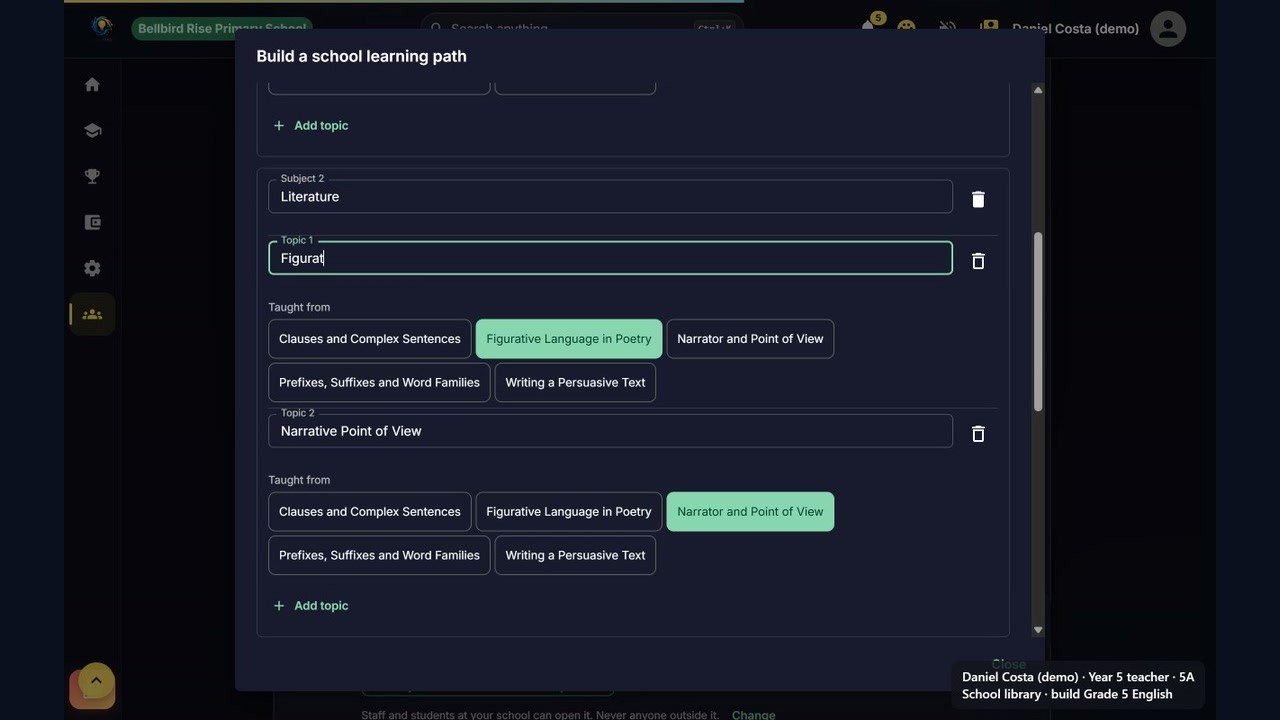
Bellbird Rise (demo) · Part 3 · 3:06
Building Grade 5 English and Maths paths from the library
Grading, the Class Page and a Live Quiz
In 5A's assignments, Daniel opens the fractions quiz, writes a comment, picks a grade and approves, and the learner sees both. The class page shows the average from the class's own quiz results and any open help requests, and Class Progress ranks who needs help first.
For a live quiz, the room code goes on the board, players join from their own devices with the code and a nickname, and a live leaderboard sits beside each question. Afterwards, the podium and question insights show how the class did on each question. Teachers see class-wide results, never AI chat transcripts.
“The school uses its own materials, so the topic comes from the school's path: Fractions and Decimals.”
Key benefits
Comments and grades the learner can see
Class Progress ranks who needs help first
Live quizzes on a topic from the school's own path
Question insights after every live quiz

Bellbird Rise (demo) · Part 9 · 4:00
Grading, a live class quiz, school results and parent oversight
“At Bellbird Rise every topic is taught only from the library material mapped to it.”
Narration, Part 3 of the Bellbird Rise (demo) video series
All Features at a Glance
Joining Bellbird Rise
Daniel Costa teaches Year 5 at Bellbird Rise Primary School. Bellbird Rise is a fictional Melbourne primary school set u...
Filling the School Library
Under the school's rule, AI content can only come from the school's own materials, so nothing can be built until the lib...
Grade 5 English and Maths Paths
Daniel ticks the five English resources and chooses Build a learning path. The AI drafts an outline from the resources t...
Grading, the Class Page and a Live Quiz
In 5A's assignments, Daniel opens the fractions quiz, writes a comment, picks a grade and approves, and the learner sees...
Frequently Asked Questions
Create a classroom from your Teacher Dashboard. The system generates a unique join code (CLS-XXXX). Share it with students and they join from their dashboard.
No. By design, teachers see classroom analytics, curriculum heatmaps, progress alerts for students in their own class, and flagged wellbeing concerns. Individual AI chat transcripts are never visible to teachers.
AI features for under-16s require parental consent, learning records are stored in Melbourne, and contact details are scrubbed before AI processing.
The copilot analyses your classroom's quiz data, learning path completion, and engagement patterns to surface actionable suggestions ranked by priority.
Free to use. No per-seat fees, no licences, no invoice to your school. Every feature is available at no cost for every teacher, and every student gets a free monthly AI allowance — about 40 new quizzes' worth, starting again at the beginning of each month. Optional one-off packs are bought at home and never charged to you or your school.
Yes. The curriculum heatmap can be exported as a PDF. Student analytics can be printed or shared with your head of department.