The learning app that learns you back.
Adaptive quests, talking 3D tutors and a world that grows with you — Kids World under 13, Teen Studio for teens, full controls for grown-ups. Any learner, any topic: follow a curriculum path, type your own subject, or learn from your own documents.
No sign-up · No credit card · Any age — under 16, the AI helpers wait for a grown-up
This site is protected by reCAPTCHA and the Google Privacy Policy and Terms of Service apply.
Alex's Quest Kingdom
Scout is ready to exploreToday's Quest · Fractions
Four stops. One tap each. No rush.Scroll
Train
Quest
Boss
You're on a roll! 🌟
Start on your curriculum, not a blank page
Pick where you learn and what you want to work on. We build the learning path for you — no account, no card, no forms.
Ready-made paths on the Australian Curriculum v9 (Foundation–Year 10) and US K–12 standards (Kindergarten–Grade 10) — or bring your own topic, or your own documents · Instant demo, any age
Not just the catalogue, and not just school
Three ways in that do not depend on a year level: your school files, any topic you type, or your own documents.
Resources from your school library, turned into a learning path
A school leader or teacher ticks a few files in the school library — a unit plan, a worksheet, a scanned handout — and Qwizflow builds a personalised path from them. They do not have to be curriculum material, and nothing has to be filed under a year level or a subject first.
For schools · any year level
Any topic you type, not just the ones we ship
Type a subject — anything from photosynthesis to film scoring to reading a balance sheet — and Qwizflow builds a whole learning path around it, with its own subjects, topics and quizzes.
From age 16
Your own notes and documents
Upload your own PDFs or photos of a page and get study guides, quizzes and flashcards built from what is actually in them — your lecture notes, a textbook chapter, a practice paper from last year.
From age 13
The ready-made curriculum catalogue covers Foundation/Kindergarten to Year/Grade 10. These three ways in are not limited to it — so a senior-secondary student, a university student, an apprentice or an adult picking up something new is not left out.
See it on the live product
A school builds a learning path from its own files — including one filed under no subject and no year level — and an adult with no school types a subject of their own, then turns their own course notes into a path.
Hear the difference
Play one real quiz read aloud by our free narrator, then flip any question to Studio Voice from the optional Studio Pack and hear it again. The same pack buys Studio Pictures for history, geography, English and other humanities questions.
Watch it, don't read about it
Every clip is the real app, filmed at Bellbird Rise Primary, a demo school with demo accounts, so you meet the same principal, teachers, families and Year 5 learners in each one.
Document Library (Upload + Learn)
A school library that builds its own quizzes
See how it works
9 short videos
Follow one primary school from an empty account to a working Year 5: the principal sets it up, a teacher fills the school library, and learners, parents and staff use it. Every lesson, quiz, game and tutor answer is built only from the school’s own materials.
Bellbird Rise Primary School is a fictional demo school, and everyone shown is a demo account. The sample resources are original material organised by Victorian Curriculum 2.0 Level 5 strands; the school and this series are not affiliated with the VCAA.
Watch the 9-part seriesScout
The curious oneAsks the questions you’re too shy to ask. Guesses bravely. Occasionally wrong on purpose — watch for it.
Sage
The wise oneKnows everything, hands you nothing — just hint after hint until YOU crack it. Infinitely patient.
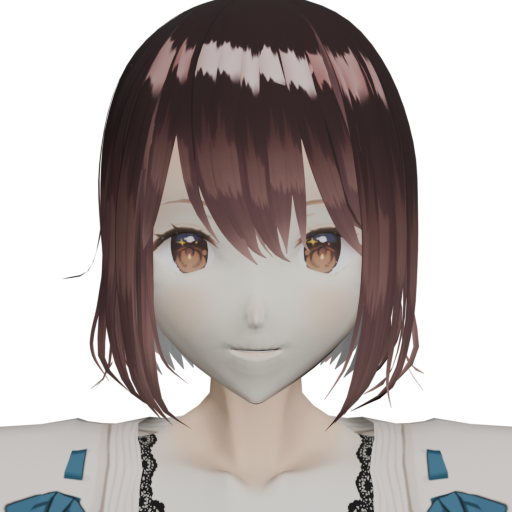
Scout
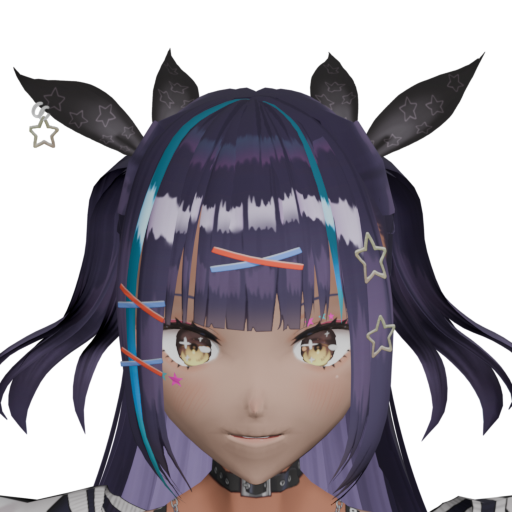
Sage
First up: Why do plants eat sunlight?
Pick your curriculum — Australia or the USA — your year level and a subject, and the path builds itself
Talking 3D tutors, adaptive quizzes and games that retune to every answer; one chat for everything
Fair XP, honest mastery, and a leaderboard that welcomes newcomers
Under-13s Never Type Into an Open Box
In Kids World the free-text composer, microphone and file upload are not rendered at all — every AI activity is tap-only from a curated set. A structural guard, not a setting.
Parents Hold the Keys — and See Everything
Every AI helper stays off for under-16s until a parent flips its own toggle, and the Transparency Ledger shows PII-scrubbed summaries of every AI conversation, with one-click erase.
Learning Records Stored in Australia
Learning records are stored in Melbourne, and personal details are stripped before anything reaches an AI provider, whose global services do the AI work. Never sold, never used to train AI models.
No Ads. No Dark Patterns.
No advertisements, no advertising trackers, no guilt-trip streaks — under-13s get encouragement-only streaks, and nothing recurring is ever pre-ticked.
Frequently Asked Questions
An AI-powered learning platform for any learner and any topic, free to start. Talking 3D tutors discuss your stuck questions, adaptive quizzes retune to every answer, and personalised learning paths follow the Australian Curriculum v9 and US K–12 standards from Foundation/Kindergarten to Year/Grade 10. The app changes shape with your age — a tap-only Kids World under 13, a sleeker Teen Studio for 13–17, and full dashboards for parents, teachers and adult learners.
No. Adult learners, university students and anyone teaching themselves a new subject use it too. The ready-made curriculum catalogue is built for Foundation/Kindergarten to Year/Grade 10, and two other ways in are not limited to it: from age 16 you can type any subject at all and get a full personalised learning path, and from age 13 you can turn your own PDFs and images into study guides, quizzes and flashcards. Schools go further and build paths from their own library files, with no curriculum framework behind them.
Yes, at any age. Everything on this page is playable now, and the guest demo drops you into the full app after you pick your age group. Under 16, the AI helpers wait for a parent or guardian to approve them, which needs a saved account, so ask a grown-up to sign in with you. Guest progress lasts until you close the browser; sign in whenever you want to keep it.
Free to start, with no advertisements, no advertising trackers and no sale of your data. Every learner gets a free AI allowance each month — enough for about 40 new quizzes — that starts again at the beginning of each month. Families who want more can buy an optional one-off credit pack — no subscription, and only a parent or a learner 16+ can buy one.
It pays attention the way a great tutor does: how quickly you answer, which topics trip you up, whether hints help. Every answer retunes the next question, warm-ups target what you nearly forgot, and the whole app grows with your age and pace. Parents can see everything it has noticed and switch any part off, per feature.
Learning records are stored in Australia, and personal information is scrubbed before anything reaches an AI provider. Parents control each AI feature individually, and the Transparency Ledger shows every AI interaction with PII-scrubbed summaries plus one-click erasure.
Six learning areas per country, from Foundation/Kindergarten to Year/Grade 10 — in Australia: English, Mathematics, Science, Humanities and Social Sciences, Technologies and The Arts; in the USA: English Language Arts, Mathematics, Science, Social Studies, Technology and Computer Science, and The Arts. That is 13,200 topics in all, scoped to your own year level so you are never shown Year 10 work in Year 4. Plus 11 language courses from Gujarati to Japanese, and opt-in Religious Studies. Beyond the catalogue, a learner 16+ can type any subject and get a full path, and from 13 any learner can turn their own documents into study guides and quizzes — neither is limited to the year levels in the catalogue.
Yes. The AI Consent Centre lets parents enable or disable each AI feature individually, with plain-English explanations banded by age. Under 16, only a parent can grant consent; 16–17 can self-consent with parent override. The age comes from the recorded date of birth on the server, so a gate cannot be talked around in the browser.
Yes. Pick USA on the home page and you get a US spine: Kindergarten to Grade 10 across English Language Arts, Mathematics, Science, Social Studies, Technology and Computer Science, and The Arts. It follows the structure and vocabulary of the Common Core State Standards for English and Maths and the Next Generation Science Standards for Science. There is no national US curriculum and Qwizflow claims no official endorsement — the Australian and US versions are authored separately, because US Science is organised around NGSS* disciplinary core ideas where Australian Science is organised around ACARA sub-strands. Grades 11 and 12 are not in the published catalogue; a learner that senior can still type their own subject or learn from their own documents.
Yes, and it is free. Qwizflow is a progressive web app: on Android and desktop Chrome you get an install button, and on an iPhone or iPad you add it from the Safari share sheet. It then opens like any other app, with its own icon, shortcuts straight to a quiz or a review, and an unread badge on the icon. There is nothing to download from an app store and no separate account.
The app is translated into ten languages: English (Australian and Indian), Hindi, Punjabi, Gujarati, Tamil, Telugu, Arabic, Chinese and Vietnamese, with a few screens still in English. Separately, Languages is a subject: 11 courses from Gujarati to Japanese, each with ten strands from script and sounds through to conversations and travel.
Ready when you are
Jump straight in — no forms, no card, no fuss. Your tutors are already warmed up.
Like it? Keep it.
Everything you do here lives in this browser. Add an account and it follows you everywhere — school, home, grandma's iPad. One tap does it.
Free to start · No ads · Under 16? A parent signs in here, then approves your AI helpers.