The learning app that learns you back.
Adaptive quests, talking 3D tutors and a world that grows with you — Kids World for little legends, Teen Studio for Years 7–10, full controls for grown-ups. Free to start, safe, and built on 13,200 real curriculum topics.
No sign-up · No credit card · Instant demo is 16+ — younger legends bring a parent
Alex's Quest Kingdom
Scout is ready to exploreToday's Quest · Fractions
Four stops. One tap each. No rush.Scroll
Train
Quest
Boss
You're on a roll! 🌟
What year level are you in? One tap restyles this whole page — watch the colours and the question change.
Try a Question — No Sign-Up Needed
Get one right and the ladder climbs. This is the app, playing back.
Live mastery
0%
Maths — Addition & Subtraction
Q
1
/ 5
If you have 2 apples and get 1 more, how many apples do you have now?
How confident are you?
😐 50%
Question 1 of 5 · 0 right so far
Watch it, don't read about it
Every clip below is the real app, recorded straight from the test that proves it works. Start with the age group you're here for.
Quizzes that adapt to them
Every question is generated for what this learner actually needs next — not pulled from a fixed bank.
Adaptive Quiz Session
A quiz that explains itself as you go
Pick a topic, and Qwizflow writes the quiz.
Practice that feels like play
The same questions, wrapped in something a child will choose to open again.
AI that learns how they learn
It watches what they get wrong, then changes what it asks and how it explains.
What parents and teachers see
Every AI interaction, in plain language — plus the consent switches that decide what runs at all.
Parent Coach AI (Help Tonight)
A coach for the parent, not just the child
See how it worksA different app at every age
Under-13, teen and grown-up are not themes over one screen — they are different surfaces.
Kids World
A kingdom instead of a dashboard
Under thirteen there is no dashboard at all — the home screen is a quest map.
See how it worksTeen Studio
A home screen tuned for teens
Sign in at fifteen and the whole app changes shape.
See how it worksInteractive demo · No sign-up needed
Watch two AI tutors teach — live
Meet Scout and Sage. Pick an episode and they'll talk it out, podcast-style — the exact same duo that helps you inside Qwizflow.
Scout
The curious oneAsks the questions you’re too shy to ask. Guesses bravely. Occasionally wrong on purpose — watch for it.
Sage
The wise oneKnows everything, hands you nothing — just hint after hint until YOU crack it. Infinitely patient.
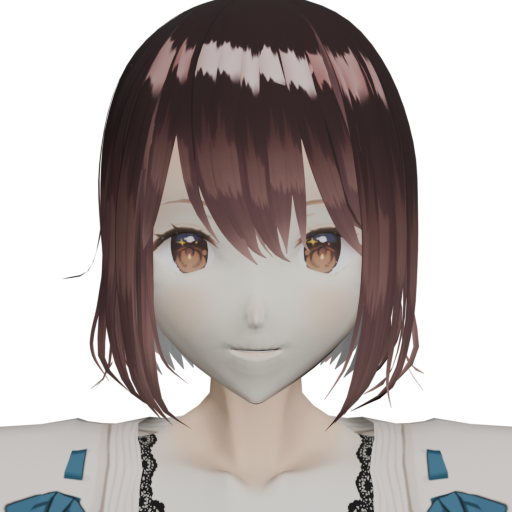
Scout

Sage
First up: Why do plants eat sunlight?
One App, Three Worlds
Qwizflow changes shape with your age — same brain underneath, totally different vibe on top.
Kids World
A quest kingdom where everything is tap-first and nothing is scary.
Teen Studio
Sleeker, faster, and deeply allergic to cringe.
Grown-up HQ
The remote control — and the receipts.
Built for Everyone
Talking 3D tutors, adaptive quizzes and games that retune to every answer
One chat for everything — say what you need and the right tool appears
Fair XP, honest mastery, and a leaderboard that welcomes newcomers
Everything for students →Safe, Private, Australian
Under-13s Never Type Into an Open Box
In Kids World the free-text composer, microphone and file upload are not rendered at all — every AI activity is tap-only from a curated set. A structural guard, not a setting.
Parents Hold the Keys — and See Everything
Every AI helper stays off for under-16s until a parent flips its own toggle, and the Transparency Ledger shows PII-scrubbed summaries of every AI conversation, with one-click erase.
Data Stays in Australia
Stored in Melbourne, voice made in Sydney, personal details stripped before anything reaches an AI provider. Never sold, never used to train AI models. Built to the ST4S framework.
No Ads. No Dark Patterns.
No advertisements, no tracking pixels, no guilt-trip streaks — under-13s get encouragement-only streaks, and nothing recurring is ever pre-ticked.
Frequently Asked Questions
An AI-powered learning platform for ages 5–18, free to start. Talking 3D tutors discuss your stuck questions, adaptive quizzes retune to every answer, and personalised learning paths cover 13,200 topics structured on the Australian Curriculum v9 and US K–12 standards. The app changes shape with your age — a tap-only Kids World under 13, a sleeker Teen Studio for Years 7–10, and full dashboards for parents and teachers.
Yes — everything on this page is playable now, and the guest demo drops you into the full app with one tap (guests confirm they are 16 or older, since AI helpers for under-16s need a parent's consent). Progress banks in your browser as XP; sign in whenever you want to keep it. Under 16? Ask a parent to sign in with you.
Free to use, with no advertisements, no tracking pixels and no sale of your data. Every student gets our best AI with a daily allowance that resets each morning; reaching it switches to a lighter mode rather than stopping. Families who want more can top up a shared credit wallet — optional, and only a parent or a student 16+ can buy.
It pays attention the way a great tutor does: how quickly you answer, which topics trip you up, whether hints help. Every answer retunes the next question, warm-ups target what you nearly forgot, and the whole app grows with your age and pace. Parents can see everything it has noticed and switch any part off, per feature.
Qwizflow is built to the Safer Technologies for Schools (ST4S) framework. Data is stored in Australia, voice runs in Sydney, and personal information is scrubbed before anything reaches an AI provider. Parents control each AI feature individually, and the Transparency Ledger shows every AI interaction with PII-scrubbed summaries plus one-click erasure.
Six learning areas per country — English, Mathematics, Science, Humanities/Social Studies, Technologies and The Arts — from Foundation to Year 10, structured on the Australian Curriculum v9 and US K–12 standards: 13,200 topics, scoped to your own year level. Plus 11 language courses and opt-in Religious Studies.
Yes. The AI Consent Centre lets parents enable or disable each AI feature individually, with plain-English explanations banded by age. Under 16, only a parent can grant consent; 16–17 can self-consent with parent override. The age comes from the recorded date of birth on the server, so a gate cannot be talked around in the browser.
The whole app is translated into English (Australian and Indian), Hindi, Punjabi, Gujarati, Arabic and Chinese, with Tamil, Telugu and Vietnamese part-way there. Separately, Languages is a subject: 11 courses from Gujarati to Japanese, each with ten strands from script and sounds through to conversations and travel.
Ready when you are
Jump straight in — no forms, no card, no fuss. Your tutors are already warmed up.
Like it? Keep it.
Everything you do here lives in this browser. Add an account and it follows you everywhere — school, home, grandma's iPad. One tap does it.
Free forever · No ads · Under 16? A parent signs in here, then approves your AI helpers.